1


Stay in Touch
Get the latest updates, special offers, and exclusive Cinchy perks straight to your inbox.


Jl. Plawa No.50, Seminyak, Kec. Kuta, Kabupaten Badung, Bali 80361

CALL US 24/7
(+62-851-7424-6249)
Copied!

We’ll be Back
at
8:30 AM-9 PM WITA




Payment Partners


© 2026 CINCHY. ALL RIGHTS RESERVED.
Cinchy Blog / How to Replace Scoopy Smart Key Battery & Where to Buy
Published: 06 Mar 2026

By Ulfah Alifah
Travel Enthusiast
Free Cancellation
24/7 Support
Insurance
Start Date - End Date
Start Time
End Time
Duration
0 Day(s)
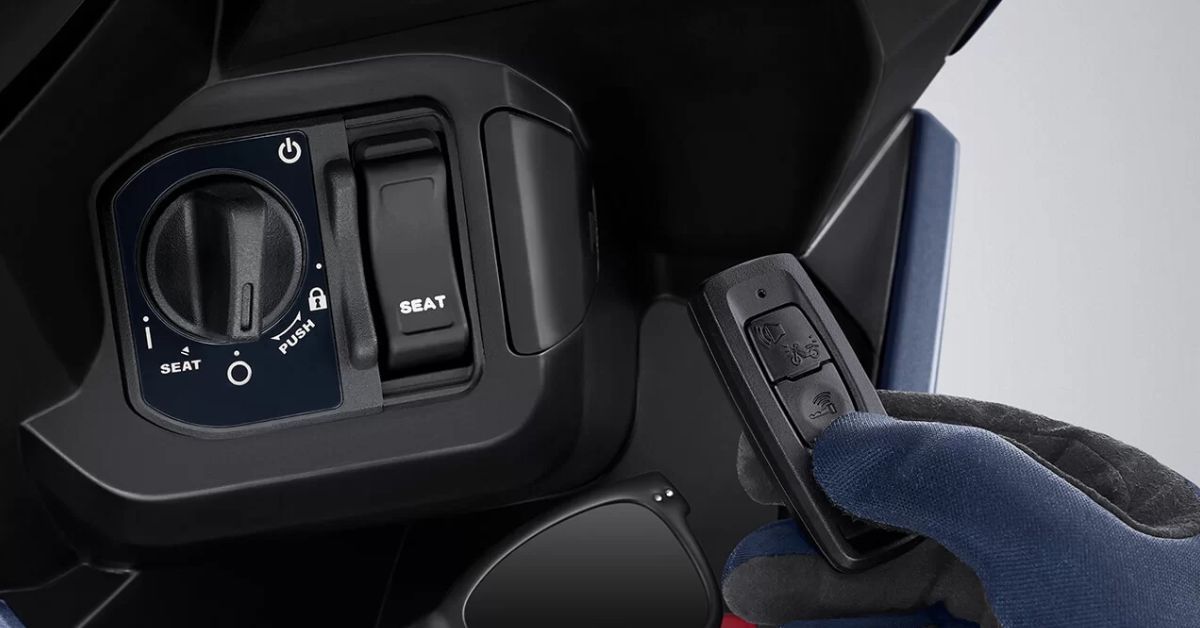
Your Honda Scoopy suddenly will not respond to the remote. The scooter does not unlock. The indicator light blinks five times. Or the remote needs to be pressed multiple times before anything happens. All of these are classic signs that your smart key battery is running low — or already dead. The good news? Replacing the Honda Scoopy smart key battery is a simple 5-minute job you can do yourself, anywhere, with a battery that costs less than a cup of coffee.
This complete 2026 guide covers everything: the exact battery type you need, where to buy it in Bali and across Indonesia, the full step-by-step replacement process, how to know when the battery is failing, and what to do if the remote still does not work after replacement.
All Honda Scoopy smart key remotes — across the 2018, 2019, 2020, 2021, 2022, 2023, 2024, and 2025 models — use the same battery type:
CR2032 Lithium Coin Cell Battery
Here are the key specifications:
The CR2032 is one of the most widely available coin cell batteries in the world. You can find it at phone accessory shops, minimarkets, electronics shops, pharmacies, and online marketplaces across Bali and Indonesia. It is also the same battery used in many car key remotes, digital watches, calculators, and small electronics — so it is universally stocked.
The Honda Scoopy smart key system gives you clear warning signs before the battery dies completely. Catching these early means you can replace the battery before being stranded.
Watch for these signs:
If you are experiencing any of these symptoms, do not wait for a complete failure. Replace the CR2032 battery immediately.
For a comprehensive guide on all the reasons a Scoopy smart key stops working — including battery, signal, and scooter battery issues — read our full article on Honda Scoopy smart key not working: quick fixes and solutions.
One of the best things about the CR2032 is how easy it is to find. You do not need to visit a Honda dealer or a specialist shop. Here is a complete breakdown of where to buy one:
Both Indomaret and Alfamart stock CR2032 batteries in their small electronics and household goods sections. These chains have branches on almost every main road in Bali — in Kuta, Seminyak, Canggu, Ubud, Sanur, Uluwatu, and Denpasar. Price: approximately IDR 15,000 to IDR 25,000 per battery.
Any mobile phone accessory shop (often called toko HP) will stock CR2032 batteries. These are found in every shopping centre and along most main commercial streets across Bali. They sometimes sell multi-packs at a slightly better rate.
For guaranteed genuine quality, visit your nearest Honda authorized dealer (AHASS — Astra Honda Authorized Service Station). AHASS stores are located throughout Bali and are the most reliable source for OEM-spec batteries. Staff can also confirm compatibility with your specific Scoopy model year.
Larger electronic shops and hardware stores in Denpasar's Teuku Umar corridor or Sunset Road carry multi-brand coin batteries including CR2032. Price may be slightly lower when buying in packs of 5 or 10.
If you prefer home delivery or want to stock up on spares, CR2032 batteries are sold in bulk packs online at extremely low prices — sometimes IDR 5,000 to IDR 10,000 per battery when bought in packs of 5. Delivery within Bali through same-day services is available for most of these platforms.
Many pharmacies in Bali stock CR2032 batteries in their electronics or household accessories section. This is useful if you are in an area without a minimarket nearby. Price: approximately IDR 20,000 to IDR 30,000.
Pro tip: Always carry one spare CR2032 battery in your scooter's under-seat storage or your bag. It is small enough to forget about — and invaluable when you are far from a shop and the battery dies mid-ride.
You do not need any tools to replace a Scoopy smart key battery — just your hands, a thin flathead screwdriver or a coin, and a new CR2032 battery. The whole process takes about three to five minutes.
Look at the edge of your Honda Scoopy smart key remote. You will see a thin seam or slot running along the middle of the casing where the two halves meet. This is where you will insert your tool to open the remote.
Wrap a thin flathead screwdriver in a soft cloth to protect the remote casing from scratches. Insert the tip gently into the seam. Apply light, even pressure and twist or pry carefully to separate the two halves of the casing. Do not force it. The casing opens with gentle pressure — no tools beyond a small screwdriver are required.
Once the casing is open, you will see the round silver CR2032 battery sitting in its holder. Note the orientation carefully before removing it — the positive (+) side faces upward. Use your fingernail or the screwdriver to gently pop the old battery out of its holder. Do not touch the circuit board or the metal contacts with your fingers.
Before inserting the new battery, inspect the metal contacts inside the holder. If you see any rust, oxidation, or buildup, clean it gently with a dry cloth or a cotton swab. Dirty contacts can cause connection failures even with a brand-new battery.
Place the new CR2032 battery into the holder with the positive (+) side facing up — the same orientation as the old battery. Press it gently but firmly into place until it seats correctly.
Align the two halves of the casing and press them firmly together. You should hear and feel a clear click when the casing snaps shut correctly. If it does not click cleanly, check that the battery is fully seated in its holder and try again.
Press any button on the remote. The indicator light should flash green. A green light confirms that the battery is installed correctly and the remote is working. If the light flashes red, the remote may be in a locked state — hold the button for 5 to 10 seconds to unlock it.
If you press the button and nothing lights up — or the range is still short after replacement — the problem may not be the remote battery. Read on for what to check next.
For a full troubleshooting guide covering every Honda Scoopy smart key model from 2023 to 2025 — including all types of smart key failures and their solutions — read our detailed article on Scoopy smart key 2023–2025 models not working and how to fix them.
If you have replaced the battery and the remote still does not work properly, there are several other causes to investigate:
The smart key system depends on the scooter's main 12V battery to operate. If the scooter's battery is below 12V, the smart key system will not function properly — even with a fresh remote battery.
Signs of a weak scooter battery include:
If you suspect the scooter battery is weak, have it tested at a nearby repair shop or call for roadside assistance. For a full guide on identifying and fixing a weak scooter battery in Bali, read our article on signs of a weak motorcycle battery and how to fix it for riders in Bali.
If the indicator light shows red instead of green when you press the button, the remote is in a locked state. This is a security feature, not a battery issue. To unlock: hold the button continuously for 5 to 10 seconds until the light turns green.
Electronic interference from nearby devices — particularly your mobile phone — can disrupt the smart key signal. Keep the remote in a separate pocket from your phone and test the range again from directly beside the scooter.
If the remote is working (green light, good range) but the scooter still will not respond to the ignition button or handlebar lock, the issue may be in the keyless ignition system itself rather than the remote.
For a complete guide on keyless ignition problems — causes, fixes, and when to seek professional repair — read our article on motorcycle keyless ignition stuck: causes and fixes.
Physical damage to the circuit board inside the remote — from dropping it in water or a hard impact — can cause permanent failure. In this case, a new remote must be sourced and programmed at a Honda AHASS dealer.
For everything you need to know about what to do when your Scoopy smart key remote is lost or permanently damaged — including emergency starting procedures, replacement costs, and where to get a new remote programmed — read our complete guide on what to do when your Honda Scoopy smart key remote is lost.
Different Scoopy model years use slightly different versions of the smart key remote, although all use the same CR2032 battery. Understanding which type you have helps you troubleshoot more accurately.
The four main smart key types across recent Scoopy models differ in their button layout, indicator light position, and signal range:
All four types use CR2032 and follow the same battery replacement steps described above. For a complete guide to all Scoopy smart key types, their specific features, and how each one works, read our full article on Honda Scoopy smart key types and complete working guide.
Once your smart key is working again, locking your scooter correctly is the next step in keeping it safe. The handlebar lock on a smart key Scoopy works differently from a traditional physical key lock.
To lock the handlebars on a Honda smart key scooter:
If the handlebar lock feels stiff or the system does not respond, a low remote battery is one of the first causes to check — which is why replacing the battery promptly matters beyond just starting the scooter.
For the full step-by-step handlebar locking guide with diagrams and tips for smart key Scoopy models, read our dedicated article on how to lock handlebars on Honda smart key scooters.
A working smart key is just one layer of protection for your scooter in Bali. Here are additional practical habits that reduce theft risk significantly:
For a full guide on how to protect yourself and your rental scooter from theft while exploring Bali, read our article on how to stay safe from theft in Bali.
If you lose the smart key remote while renting a Scoopy from Cinchy, contact Cinchy's 24/7 support line immediately:
Losing the smart key remote is listed as a damage liability under Cinchy's rental terms. The cost of a replacement remote and reprogramming is the renter's responsibility unless covered under Full Insurance. Do not attempt to start the scooter through any unofficial method without contacting the Cinchy team first.
For the exact emergency procedures to follow if the remote is lost — including how to access the scooter's seat storage without the remote — read our step-by-step guide on what to do if your Honda Scoopy smart key remote is lost.
If the smart key remote stops working mid-ride and you cannot replace the battery immediately, there is an emergency starting procedure built into the Honda Scoopy system.
This procedure allows you to open the seat, access the battery, and operate the scooter using the emergency mechanical key included with the smart key set. The steps are model-specific but generally follow the same process across all Scoopy generations.
For the full emergency starting guide — with clear steps for each Honda Scoopy smart key type — read our complete article on how to start a keyless scooter: simple step trick.
Replacing the battery reactively is fine — but a few preventive habits will extend remote battery life and prevent you from being caught off guard:
For additional scooter maintenance tips that keep your Honda Scoopy running reliably throughout any Bali trip, read our guide on Honda Scoopy fuel consumption in Bali rides — which covers fuel management, riding habits, and efficiency tips that extend the life of both the engine and battery.
Here is a quick reference for CR2032 battery prices in Bali in 2026:
The total cost of a DIY battery replacement is a maximum of IDR 35,000 — making it one of the cheapest and easiest maintenance tasks any scooter owner or renter can perform.
If you are renting a Honda Scoopy in Bali and encounter any smart key issue — battery-related or otherwise — Cinchy's 24/7 support team is always available to assist. Every Cinchy scooter in the fleet is regularly serviced and inspected before delivery, including smart key remote testing and battery checks.
When you rent from Cinchy, your Honda Scoopy comes with:
For the complete guide to renting a Honda Scoopy in Bali — including pricing, model options, and what is included — read our article on how to rent a Honda Scoopy in Bali.
And for a full overview of the best fuel to use in your Scoopy for optimal performance throughout your Bali trip, read our dedicated guide on the best fuel for Honda Scoopy in Bali.
Replacing a Honda Scoopy smart key battery in 2026 takes five minutes and costs less than IDR 35,000. The battery is CR2032, available at hundreds of shops across Bali. The process is tool-free, risk-free, and completely DIY. Knowing how to do it — and where to buy the battery — means a dead remote never has to stop your ride.
👉 Explore Cinchy Life's Honda Scoopy fleet, pricing, and what's included:
Explore Cinchy Life →
👉 Book your Honda Scoopy rental in Bali — delivered to your door, fully ready to ride:
Book Your Scoopy →
 travel tips
 hidden gems
 scooter guides
 riding tips
 bali guides
 cultural insight